
Patients · Patient Insurance
Understanding Patient Cases #
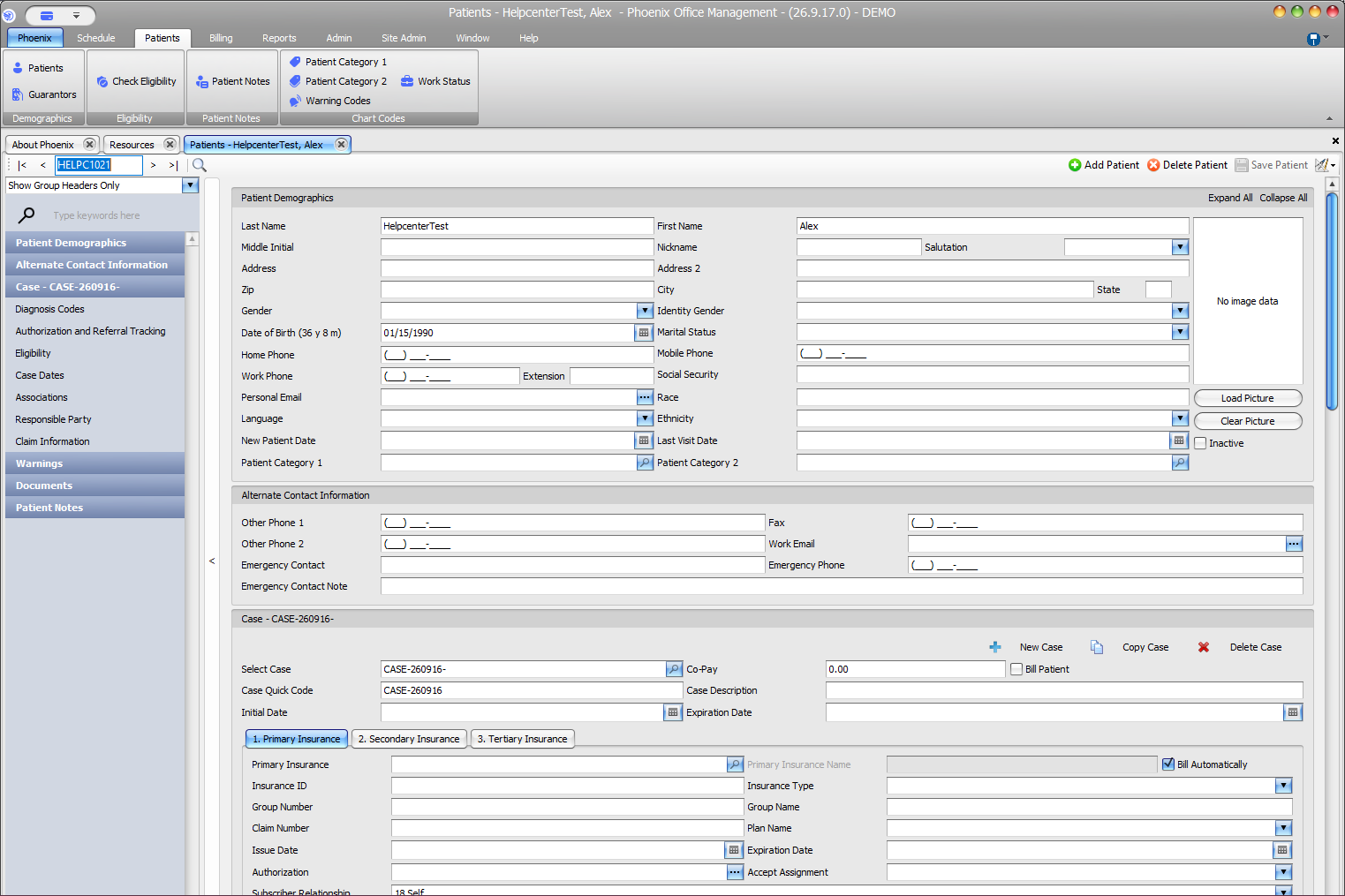
A case groups the patient-specific insurance and billing context used for a particular situation. Select the correct patient first, then confirm the case before working with insurance or other case-specific information.
Keyboard shortcuts: In a form, press F2 to save and Esc to close. On data-entry-heavy screens, press Ctrl+↓ for the next layout group or Ctrl+↑ for the previous layout group.
Why the case matters #
The patient record identifies the person. The case provides the billing context attached to that patient. This allows Phoenix to keep patient identity separate from case-specific insurance information.
- Find and verify the patient.
- Review the selected case.
- Confirm that the case matches the work you are about to perform.
- Then review or edit the insurance and billing information for that case.
Information tied to the case #
The current patient workflow shows separate Primary Insurance, Secondary Insurance, and Tertiary Insurance areas within the case. Training material also describes case-specific authorization, referral, and related billing context; use only the fields your office has verified for the task at hand.
Patient and insurance company are separate too
The practice’s insurance-company record contains payer-level setup. The patient case contains the patient’s policy, subscriber, coverage order, and other patient-specific coverage information.