

Protecting Your Practice Data
Your practice data may be one of the most valuable assets in your organization.
Patient information, billing records, claims, payment history, reports, documents, and years of operational data can be difficult—or impossible—to recreate if they are lost.
Hardware fails. Files are accidentally deleted. Software can become corrupted. Computers can be stolen or damaged. And increasingly, ransomware and other cyberattacks can make entire systems inaccessible.
A reliable backup and recovery plan gives your practice a way back.
Backups Are Your Safety Net
A backup is a separate copy of important data that can be used to restore information when the working copy is lost, damaged, corrupted, or otherwise unavailable.
For healthcare organizations handling electronic protected health information, backups are also an important part of contingency planning. The HIPAA Security Rule requires regulated entities to establish procedures for creating and maintaining retrievable copies of ePHI and procedures for restoring lost data.
The goal is not simply to say that a backup exists.
The goal is to know that your data can actually be recovered when you need it.


What Should You Back Up?
Focus first on information that would be difficult, expensive, or impossible to recreate.
For a medical practice or billing service, that will usually include your current practice-management databases, patient and billing information, documents, reports, configuration files, and any other business data created by your staff.
Software installers themselves are generally less important than the data those programs contain. In many cases, the application can be reinstalled. Your years of patient and financial information cannot.
If you are unsure where your practice-management database is actually stored, verify it before assuming your backup system is protecting it.
One of the worst times to discover that you have been backing up the wrong folder is when you are trying to restore after a failure.
How Often Should You Back Up?
Ask yourself one simple question:
How much work could we afford to lose?
If losing an entire day of data would create a serious problem, backing up only once per day may not be enough.
At a minimum, important practice data should generally be backed up every day. Many modern systems can protect changing data much more frequently through scheduled or continuous backups.
The right frequency depends on how quickly your data changes and how much information your practice could reasonably recreate after a failure.


Use More Than One Copy
A backup stored on the same computer as the original data does not provide much protection if that computer fails, is stolen, or becomes infected.
A useful modern rule is the 3-2-1 backup strategy:
3 copies of your important data
Your working copy plus two backup copies.
2 different storage locations or technologies
For example, a local backup appliance and a cloud backup service.
1 copy stored separately from your primary environment
This could be an off-site, offline, or otherwise isolated backup.
CISA recommends maintaining multiple copies of important data and keeping a copy in a physically separate or secure location so a single incident cannot destroy both the production data and the backups.
Local and Cloud Backups Work Best Together
Modern practices no longer need a stack of floppy disks, Zip disks, CDs, or tapes sitting next to the server.
A better approach for most offices combines fast local recovery with off-site protection.
A local backup can make restoring a deleted file or damaged database fast and convenient.
An off-site or cloud-based backup protects the practice if the office itself is affected by theft, fire, hardware loss, or another event that damages the local systems.
Neither should necessarily be your only copy.
If you use a cloud backup provider and the service stores ePHI, make sure your practice evaluates the service appropriately for its HIPAA obligations, including any required business associate arrangements and security controls.
Automated Backups Are a Good Thing
Older backup systems often required someone to physically insert a disk or tape and manually start the job every evening.
Modern backup systems should usually be automated.
Automation reduces the chance that a busy employee simply forgets to run the backup.
But automation does not mean you can forget about the backup system entirely.
Someone should still be responsible for reviewing backup failures, confirming that jobs are completing successfully, and responding when something stops working.
A backup program quietly failing for six months is not a backup strategy.
Protect Your Backups From Ransomware
Modern ransomware attacks may target backups specifically because attackers know that a working backup gives the organization a way to recover without paying them.
At least one backup copy should therefore be protected from easy modification or deletion by the same computers and credentials used during normal operations.
Depending on your backup system, this may mean using offline storage, isolated backup infrastructure, separate credentials, or immutable backup storage that cannot be immediately changed or deleted.
HHS has specifically warned healthcare organizations that attackers may target backup systems and emphasizes keeping backups secure, recoverable, and current.
Encrypt Sensitive Backup Data
A backup containing patient information deserves the same level of attention as the original data.
Backup files containing ePHI should be protected from unauthorized access and stored using appropriate security controls. HHS guidance identifies encryption, backup security, storage location, and key management among the issues organizations should consider when developing backup procedures.
This is especially important for portable drives, off-site backups, and cloud services.
A lost backup drive containing unprotected patient information can become a much larger problem than the hardware itself.
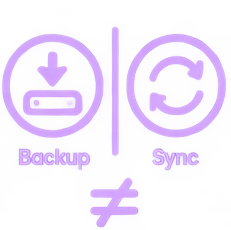
A Backup Is Not the Same as Sync
File synchronization services are useful, but synchronization by itself should not automatically be treated as a complete backup strategy.
If a file is accidentally deleted, encrypted by malware, or overwritten with incorrect data, a synchronized copy may reproduce that same change.
Similarly, RAID, mirrored hard drives, and redundant servers can improve availability, but they do not replace a separate backup.
Redundancy helps keep systems running.
Backups help you go backward.
You generally want both.

Test Your Backups
This is one of the most important parts of the entire process.
A backup that has never been restored is an assumption.
Periodically perform a test restore and verify that the restored information can actually be opened and used.
HHS specifically recommends reviewing backup logs, verifying the integrity of backed-up data, and conducting periodic test restorations so organizations know their recovery process works before an emergency occurs.
You do not want your first restore attempt to happen while the practice is already down.
Before You Assume You’re Protected
Periodically verify all of the following:
- The correct, current practice data is actually being backed up.
- Backups are running on the expected schedule.
- Someone is reviewing failures and warnings.
- More than one copy of critical data exists.
- At least one copy is separated from the primary system.
- Backup data containing sensitive information is appropriately protected.
- Older recovery points are available when needed.
- A test restore has been completed successfully.
- Your practice knows who is responsible for recovery during an emergency.

When Should You Restore From a Backup?
A restore may be appropriate when current data has been deleted, damaged, corrupted, encrypted, or otherwise becomes unusable.
But do not immediately overwrite your current data simply because something appears to be wrong.
If possible, first determine what happened and preserve the existing system. A software problem, database issue, ransomware incident, or hardware failure may require different recovery procedures.
Restoring the wrong backup—or restoring a good backup into a compromised system—can make the situation worse.
When the cause of the problem is unclear, contact your IT provider or software support team before making major changes.
Restoring Your Data
Modern backup platforms handle restoration differently, so there is no longer one universal “Full backup followed by Differential backup” procedure that applies to every practice.
Instead, identify the most recent known-good recovery point from before the problem occurred.
Restore the data into a safe environment when possible, verify that it is complete and functional, and only then return the recovered information to production.
If the newest recovery point contains the same problem, move backward to an earlier recovery point until a clean copy is found.
The most important part of the recovery process is not the specific backup technology being used.
It is knowing that you have multiple recovery points, that they are protected, and that you have tested how to restore them.
Don’t Wait Until You Need the Backup
Backups are easy to ignore because most days you do not need them.
Then one day, you do.
A reliable backup system should operate automatically, keep multiple protected copies of your important data, store at least one copy separately from your production systems, and be tested regularly.
The time to find out whether your backup strategy works is before something goes wrong.
If you are unsure whether your current PSS or practice-management data is being backed up correctly, contact your IT professional or PSS before making changes to your backup configuration.